

Technology can sometimes feel intimidating, especially when words like virus or malware appear on your screen. For many people, a computer is simply a tool for work, study, shopping, or staying in touch with family. It should not feel stressful to use. Learning about computer virus prevention does not require technical knowledge or complicated steps. It is really about understanding a few simple habits that keep your device running smoothly. Just like learning the basics of online banking or video calls, this topic becomes much easier once it is explained clearly. With a calm approach and a bit of awareness, anyone can feel more confident and relaxed while using their computer.
What computer viruses are and why they cause problems
A computer virus is a type of harmful software that can enter your system without permission. It may slow things down, show strange messages, or affect your files. Some viruses are created to steal information, while others simply disrupt how your computer works. Understanding the basics is an important part of computer virus prevention because it helps you recognize early warning signs.
Viruses often arrive through email attachments, unsafe downloads, or fake websites. They do not usually appear on their own. Knowing this makes the problem feel more manageable. When you understand how viruses spread, you can avoid the most common risks without changing how you normally use your computer.
How to prevent computer virus through everyday habits
One of the easiest ways to stay safe is to be careful about what you click. If an email looks unusual or asks you to open a file you were not expecting, it is best to pause. This simple habit plays a big role in computer virus prevention and does not require any special tools.
Keeping your operating system updated also helps. Updates often include security fixes that block new threats. Think of updates as quiet background improvements that strengthen your device. When these updates run regularly, your computer becomes better at protecting itself without you needing to do anything extra.
How can we prevent computer virus using security software
Security software acts like a guard that watches what enters your system. Antivirus programs scan files and alert you when something looks suspicious. Installing trusted security software is a key step in computer virus prevention, especially for people who use the internet daily.
Once installed, most antivirus tools work quietly in the background. They update themselves and scan automatically. This means you do not have to constantly check settings or run scans manually. It creates a sense of ease, knowing there is something looking out for your device while you focus on your tasks.
How can you prevent a virus on a computer when browsing online
Web browsing is one of the most common ways viruses spread. Visiting unsafe websites or clicking on unknown ads can lead to trouble. Learning computer virus prevention for browsing is about choosing trusted websites and paying attention to your browser warnings.
Modern browsers often alert you if a site seems unsafe. When you see these warnings, it is best to leave the page. Avoid downloading software from random sites and stick to official app stores or company websites. These small choices greatly reduce risk and help your computer stay stable and secure.
How do you prevent a computer virus from email and downloads
Email remains a popular way for viruses to spread. Messages that create urgency or offer unexpected rewards should always be treated with care. Practicing computer virus prevention in email means checking the sender and avoiding attachments from unknown sources.
Downloads should also come from trusted places. Free tools or media from unfamiliar sites may carry hidden threats. If something feels uncertain, it is better to skip it. Over time, this cautious approach becomes second nature and keeps your system free from unwanted software.
How to prevent viruses on your computer with strong passwords
Passwords are another important layer of protection. Weak passwords make it easier for attackers to access your system. Using strong and unique passwords supports computer virus prevention by limiting unauthorized access.
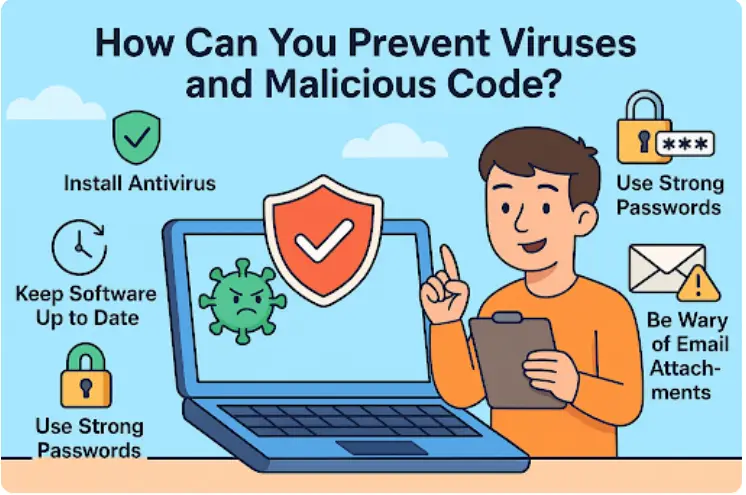
A strong password usually combines letters, numbers, and symbols. It does not need to be hard to remember if you use a password manager. This extra step keeps your accounts safe and prevents harmful software from spreading through compromised logins.
Prevention of computer virus through regular maintenance
Regular maintenance keeps your computer healthy. This includes clearing temporary files, removing unused programs, and restarting your device from time to time. These simple actions support computer virus prevention by reducing hidden risks.
Maintenance also helps you notice changes in performance. If your computer suddenly becomes slow or behaves oddly, you are more likely to notice it early. Early detection makes it easier to address problems before they grow larger or affect important data.
Teaching safe computer use to family members
Many virus infections happen when multiple people share the same device. Teaching basic safety rules to family members is part of computer virus prevention that often gets overlooked. Simple guidance, like avoiding unknown links or downloads, can make a big difference.
Children and older adults especially benefit from clear explanations. When everyone understands the basics, the computer stays safer for all users. It also reduces stress, since fewer problems mean fewer interruptions and less time spent fixing issues.
Feeling confident and relaxed while using technology
Staying safe online does not mean being fearful. It is about awareness and small habits that build confidence. Computer virus prevention works best when it feels natural and manageable, not overwhelming. Over time, these habits blend into daily computer use.
When you know how to protect your device, technology feels more supportive and less stressful. You can focus on work, communication, or entertainment without worry. With a calm approach and a few simple practices, using a computer becomes a smooth and enjoyable part of everyday life.
Keyword Section
computer virus prevention,how to prevent computer virus,how can we prevent computer virus,how can you prevent a virus on a computer,how do you prevent a computer virus,how to prevent viruses on your computer,prevention of computer virus,computer virus protection tips,ways to avoid computer viruses,computer security for beginners,
Frequently Asked Questions
What is computer virus prevention in simple words
Computer virus prevention means taking basic steps to stop harmful software from entering your computer. This includes being careful online, keeping your system updated, and using security software. It is about avoiding problems before they start rather than fixing them later.
How can I tell if my computer has a virus
Common signs include slow performance, strange pop up messages, programs opening on their own, or your browser redirecting to unknown websites. These signs do not always mean a virus, but they are a good reason to run a security scan.
Do I really need antivirus software
Yes, antivirus software is helpful for most users. It works quietly in the background and protects your computer from common threats. Even careful users benefit from this extra layer of safety.
Can viruses spread through emails
Yes, emails are a common source of viruses, especially through attachments or suspicious links. It is always safer to open emails only from people you trust and avoid clicking on anything that feels unusual.
Are system updates important for virus protection
System updates are very important. They fix security weaknesses that viruses often try to exploit. Keeping updates turned on helps your computer stay protected without extra effort.
Conclusion
Using a computer should feel simple, not stressful. Once you understand the basics, staying safe online becomes part of your normal routine. Computer virus prevention is not about knowing advanced technology but about building a few smart habits over time. Being careful with emails, downloads, and websites goes a long way. Adding security software and keeping your system updated provides quiet support in the background. When these small steps work together, your computer stays reliable and easier to trust. With confidence and awareness, technology can feel calm, useful, and supportive in everyday life.