
Introduction
Phones are meant to make life easier. They help us stay in touch, manage work, and handle everyday tasks. But when spam calls keep interrupting your day, that calm quickly disappears. Unknown numbers, fake delivery calls, and repeated telemarketers can feel confusing, especially if you are not very comfortable with phone settings. Many people search for how to block spam calls on android because they want peace without breaking something on their phone. The good news is that Android already has simple tools built in. You do not need to install complicated apps or understand technical terms. Once you know where to look and what each option does, blocking spam becomes a small, manageable task instead of a constant annoyance.
Why Spam Calls Keep Reaching Your Android Phone
Spam calls usually come from automated systems that dial thousands of numbers every day. Your phone number may appear on a public list, a leaked database, or even through random dialing. When learning how to block spam calls on android, it helps to understand this behavior first. These calls often look local or familiar, which makes them tempting to answer. Android does not block all unknown calls by default because it cannot know which ones are important. That balance between access and protection is why you need to adjust settings manually. Once you do, your phone starts filtering suspicious patterns quietly in the background.
Using Android’s Built In Spam Protection
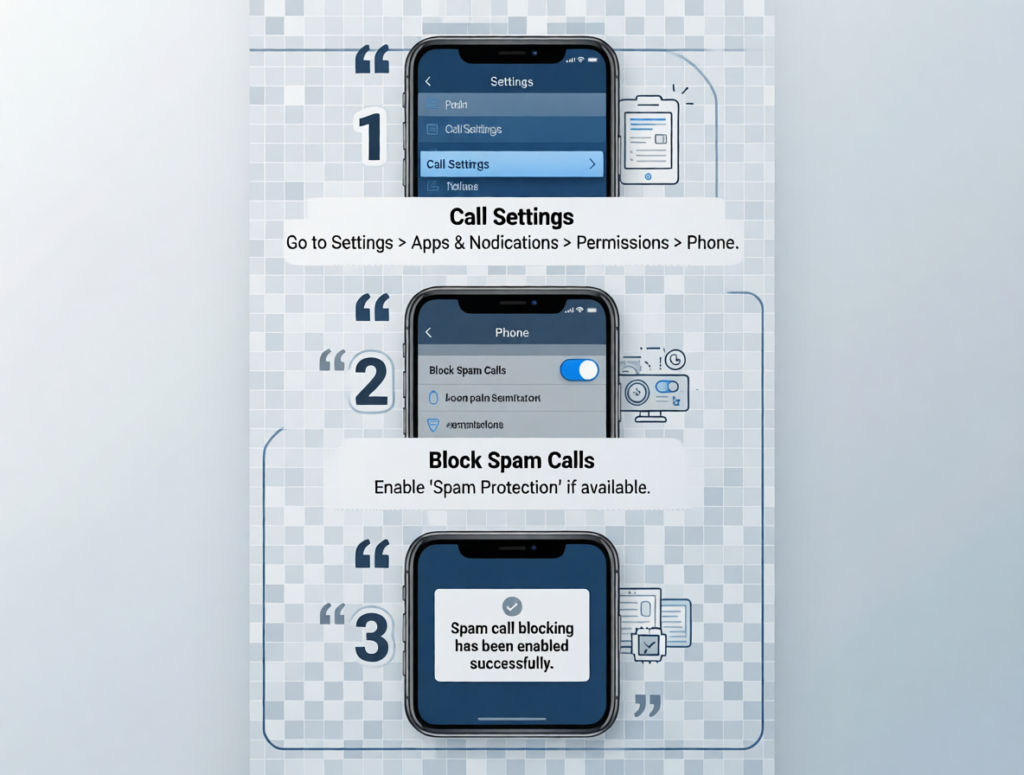
Most Android phones include spam protection inside the Phone app. Open the app, tap the three dots, and go into settings. From there, you can turn on call screening or spam protection depending on your phone brand. This is often the first step in how to block spam calls on android. Once enabled, your phone checks incoming numbers against known spam patterns. When a suspected spam call arrives, you may see a warning on your screen or the call may be silenced completely. A common mistake is forgetting to turn on notifications for blocked calls, which makes people think nothing changed.
Blocking a Specific Number Manually
If one number keeps calling you, manual blocking works well. Tap the recent calls list, select the number, and choose block or report. This direct action is part of how to block spam calls on android that many users overlook. After blocking, calls from that number no longer ring your phone. You may still see them listed as blocked, which reassures you that the feature is working. This method is best for repeated telemarketers or scam callers who use the same number. Blocking does not affect other contacts, so your regular calls stay untouched.
Reporting Spam Calls to Help Android Learn
Blocking stops calls for you, but reporting helps others too. When you choose to report a spam number, Android sends anonymous data to improve detection. This is useful when figuring out how to block spam calls on android long term. Reporting teaches the system which patterns to flag in the future. You will usually see options like report scam phone number or how to report a spam number when blocking. The difference matters. Blocking protects only your phone. Reporting improves protection for the wider network. Over time, this reduces spam across devices.
How to Stop Unwanted Phone Calls from Unknown Numbers
Some spam calls come from numbers you have never seen before. Android allows you to silence unknown callers. This setting sends calls from numbers not in your contacts directly to voicemail. It is a helpful option within how to block spam calls on android for people who rarely expect calls from strangers. You can still check missed calls later without interruption. A common misunderstanding is thinking this blocks emergency calls. It does not. Emergency and repeated callers still reach you. This feature simply reduces noise while keeping important communication intact.
Using Google Call Screen on Supported Phones
On some phones, especially Google Pixel models, Call Screen adds another layer. When enabled, Google Assistant answers suspicious calls for you. This method fits naturally into how to block spam calls on android for users who want less interaction. You see a live transcript on screen while the assistant asks the caller to explain why they are calling. Most spam callers hang up immediately. This tool works best when spam calls are frequent and you prefer not to answer unknown numbers yourself. It feels like letting your phone handle the conversation politely.
Understanding Blocking Versus Reporting
Many people confuse blocking with reporting. Blocking simply stops calls from reaching you again. Reporting tells Android and carriers that a number is spam. Both are part of how to block spam calls on android, but they serve different purposes. If you only block, spam may still affect others. If you report, the system learns faster. Reporting does not share personal information. It only shares patterns. Knowing when to use each option helps you feel more in control instead of guessing which button to tap.
Telemarketers and Persistent Spam Callers
If you keep asking how do i block telemarketers from calling, the answer often involves combining methods. Manual blocking, spam protection, and reporting work together. Telemarketers may change numbers often, which makes single blocking less effective. This is why how to block spam calls on android relies on pattern recognition rather than one time actions. Over time, your phone becomes better at identifying similar calls. Users often notice fewer interruptions after a week or two of consistent reporting and blocking.
Messages, Spam Texts, and Erased Texts
Spam does not always come as calls. Some users also receive scam texts. While learning how to block spam calls on android, it is worth noting message behavior too. Blocking a number stops calls but may not stop texts unless you block it in the Messages app as well. If you accidentally delete spam messages and later wonder about how to get erased texts, recovery is usually not possible unless backups exist. Android treats messages differently from calls. Blocking helps prevent future spam, but deleted texts are rarely recoverable without backups.
Common Mistakes When Blocking Spam Calls
One common mistake is blocking unknown numbers instead of enabling spam detection. Another is assuming blocking one number will stop all spam. Understanding how to block spam calls on android means knowing it is a gradual process. Spam detection improves over time. Another mistake is disabling notifications completely, which makes users miss legitimate calls. Always review blocked calls occasionally. This helps ensure nothing important is being filtered out by mistake.
When Blocking Does Not Seem to Work
Sometimes spam calls continue even after settings are enabled. This does not mean the system failed. Spam callers constantly change tactics. How to block spam calls on android works best when you keep settings updated and report new spam calls. Check for phone app updates regularly. Older versions may lack improved filters. Also check that spam protection is turned on, as updates can reset settings. Small maintenance keeps protection effective.
Keyword Section
how to block spam calls on android,how to stop unwanted phone calls,how do i block telemarketers from calling,report scam phone number,how to report a spam number,android spam call blocking,block unknown callers android,android phone spam calls,stop scam calls android,telemarketer calls android,spam call protection android,unknown number calls android,
Frequently Asked Questions
Why do spam callers keep reaching my Android phone?
Spam callers use automated systems that dial many numbers every day. Even if you never share your number publicly, it can still appear through random dialing or old contact lists. Android cannot block every unknown number automatically because some unknown calls may be important. That is why built in spam protection relies on patterns and user reports to improve over time.
Is blocking a number the same as reporting it?
No. Blocking stops calls from that specific number from reaching you again. Reporting tells Android and network providers that the number behaves like spam. Reporting helps improve spam detection for other users as well. Using both options together gives better long term results.
Will blocking spam calls stop important calls too?
Blocking spam calls does not affect saved contacts. If you use features like silencing unknown callers, calls from numbers not in your contacts may go to voicemail instead of ringing. You can still review them later. Emergency calls and repeated callers usually still come through.
Do I need to install an app to block spam calls?
Most Android phones already include spam call protection in the Phone app. For many users, this built in system is enough. Extra apps are optional, not required. Built in tools are usually safer and easier to manage for non technical users.
Why do spam calls sometimes continue after blocking?
Spam callers often change numbers. Blocking one number may not stop future calls from similar sources. Spam protection improves as you report more calls. Keeping your Phone app updated also helps improve detection accuracy.
Conclusion
Spam calls can make a phone feel stressful instead of helpful, but the solution does not have to be complicated. Android gives you simple tools that work quietly once you understand where they are and how they behave. Blocking and reporting calls is not about perfection. It is about gradually teaching your phone what you want to ignore. With a few small adjustments and a bit of patience, interruptions decrease and confidence grows. You do not need to be a tech expert to manage spam calls. You only need to take control step by step and let your phone do the rest in the background.